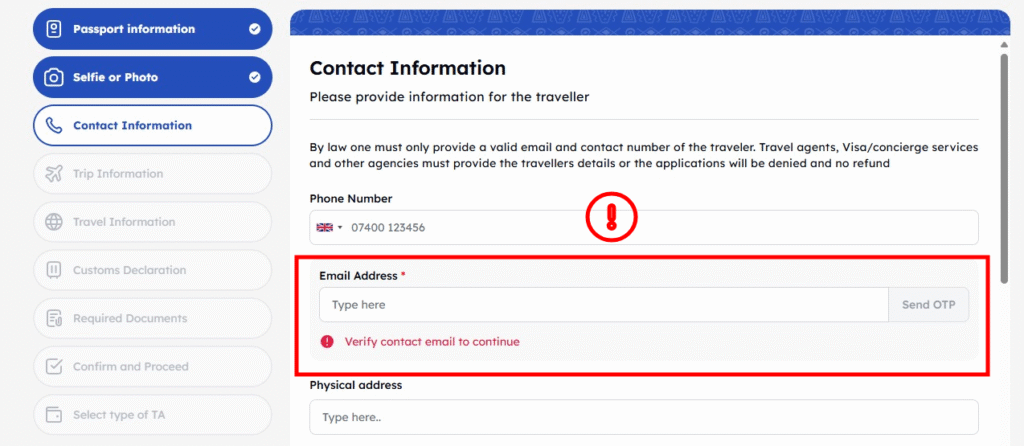
Trying to apply for your Kenya eTA on the official etakenya.go.ke website, but you’re stuck? The system asks you to “Verify contact email to continue,” but the vital OTP (One-Time Password) code is not arriving in your email?
If you’re seeing this, you’re not alone. This is a very common glitch that frustrates many travelers who are facing this exact problem. This guide explains the 4 steps to fix the OTP problem and, more importantly, what to do after you submit your application to avoid getting stuck in ‘Pending’.
What is the eTA Email OTP and Why is it Needed?
During the application, at the “Contact Information” step, the form requires you to enter your email address and phone number. To prevent email typos, there is a “Send OTP” button. This is a crucial step; if you misspelled your email, you would never receive your final approval.
When you click it, the system is supposed to email you a 6-digit verification code (e.g., T9HJAF) from donot_reply@ecitizen.go.ke, which you must enter to proceed. The problem is, this email often fails to arrive.
4 Steps to Fix the “OTP Not Received” Error
Follow these solutions in order. One of them will almost certainly work for you.
Step 1: Check Your Spam / Junk Folder
This is the most common fix. Even savvy travelers miss this. Log in to your email (Gmail, Outlook, etc.) and manually check the “Spam” or “Junk” folder. The email will be from:
- Sender:
donot_reply@ecitizen.go.ke - Subject: “eTA Account Verification”
Step 2: Use a Different Email Address (The Best Fix)
We find the official system sometimes struggles with private domains (like a private @companydomain.com email) or certain corporate email servers. These servers may have aggressive spam filters that block the email before it even reaches your spam folder.
The fastest fix is to use a major, free email provider. We recommend using an address from:
- Gmail (
@gmail.com) - Outlook / Hotmail (
@outlook.com) - Yahoo Mail (
@yahoo.com)
Go back to the application form, enter your @gmail.com address, and click “Send OTP.” The code usually arrives instantly.
Step 3: Restart the Application from Scratch
If you’re still having trouble, the application page itself may have a session error. Close your browser window completely, re-open it, and start a brand new application from the etakenya.go.ke homepage. In our practice, this “hard reset” often fixes the glitch on the second or third try.
Step 4: Wait for the System Glitch to Clear
If none of the above works, it is 100% a temporary system glitch on the official government website. The servers are likely overloaded. Do not panic. Simply wait 1-2 hours or, even better, try again the next day. This is frustrating when you are in a hurry, but the problem is with their system, not you.
Success! Now Your Application is “Pending”…
Once you get the OTP, you can finally complete your application and pay the government fee. You will then receive a confirmation email with your eTA Application Reference Number.
This is where the real wait begins. Your application status is now “Pending,” and you have no way of knowing if it’s okay, if it has a hidden error, or if it’s just stuck in a long queue of thousands of applications.
This is where eTA Rush, a recognized advocacy team, can help.
Our “Diagnosis First” Advocacy Service
Don’t wait and worry until your flight. Let us check your application’s real status for free. We are not another application service; we solve problems for applications that are already submitted.
Step 1: Get Your Free Diagnosis
Send us only your eTA Application Reference Number through our ‘Get Started’ page. We need nothing else. We will use our advocacy channels to check the true internal status (e.g., ‘In Queue,’ ‘Error: Photo Mismatch’) and email you this report for free. This proves we have access and gives you peace of mind.
Step 2: Fast-Track Your Approval
If your application is stuck, our report will include a secure payment link for our advocacy service. After you authorize us, we will take action to fast-track your application. Most cases are solved in 2-3 working hours (EAT), with a 100% guarantee of action within 24 hours of you sending us the reference number.
Travel Agents & Influencers
Do you manage multiple eTA applications for clients and face these frustrations daily? eTA Rush offers an exclusive Pay-After-Approval Partner Program for high-volume websites and travel specialists. We handle the advocacy and fast-tracking so you can focus on your clients. You only pay after your client’s eTA is approved.
Visit our Partner Program page to apply.